RAG Assistant Case Study: Cited Answers You Can Actually Measure
October 11, 2026
Most RAG assistants are judged by their best answers. This RAG assistant case study covers how I built a question answering assistant for GitLab's documentation that gives cited answers, admits when it doesn't know, and comes with a test harness that shows exactly where each wrong answer went wrong.
Project snapshot
| Detail | Summary |
|---|---|
| Project | RAG Docs Assistant: ask a question about GitLab, get a cited answer, an honest "I couldn't find this", or a clarifying question |
| Type | Personal project (R&D, applied AI) |
| Role | Solo: data pipeline, retrieval, evaluation, API, front end and deployment |
| Timeline | 6 days |
| Stack | Python, Chroma, bge-small-en-v1.5, custom BM25, ms-marco-MiniLM cross-encoder, Claude Haiku 4.5, Claude Sonnet 5.5, FastAPI, Streamlit, Langfuse, GitHub Actions |
| Dataset | 147 GitLab documentation pages, 1,461 chunks, 51 evaluation questions |
| Links | Live demo, GitHub repo, Blog post |
At a glance
- 92 to 95% of answers fully faithful to their sources (37 of 40 and 39 of 41 across the two modes tested), checked by an independent LLM judge
- 42 of 43 answerable questions had the right evidence in the top 5 results with hybrid search
- 1.7 to 1.9 s median response time and about $0.003 per question
- 5 wrong answers traced to their exact cause: search, reranker, prompt or model
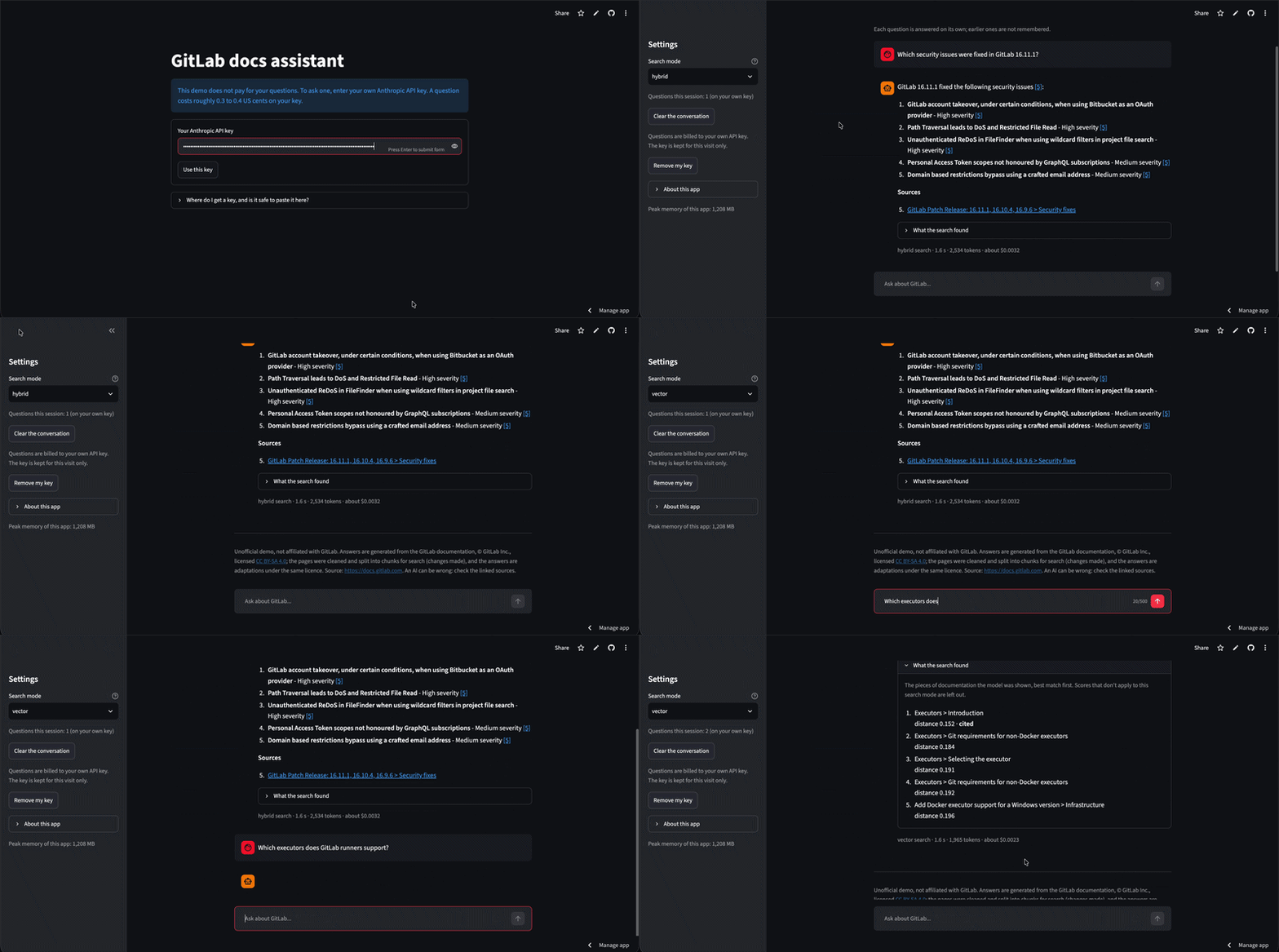
The live app: a question about GitLab 16.11.1, answered with citations.
The problem: RAG pipelines fail quietly
A first RAG pipeline usually answers the easy questions well and fails quietly on the rest. You ask a few questions, the replies look sensible, the citations point somewhere plausible, and it feels done.
When I tested my first version against real documentation, I found three kinds of quiet failure:
- The right page, the wrong chunk. The assistant retrieved the page that held the answer, but only its introduction, so it said "I couldn't find this" about something that was right there.
- Lookalike pages crowding each other out. GitLab publishes many near-identical patch release notes. A question about one release pulled in several others, and the actual answer fell out of the top 5.
- Partial answers presented as complete. Asked for the fields in a webhook payload, the assistant listed 15 of 19 and stopped, with no sign that anything was missing.
None of these show up if you only read the answers that look fine. And without a way to separate search errors from model errors, there's no way to know what to fix. That was the real problem this project set out to solve: not just building a documentation chatbot, but building one whose failures could be found, measured and explained.
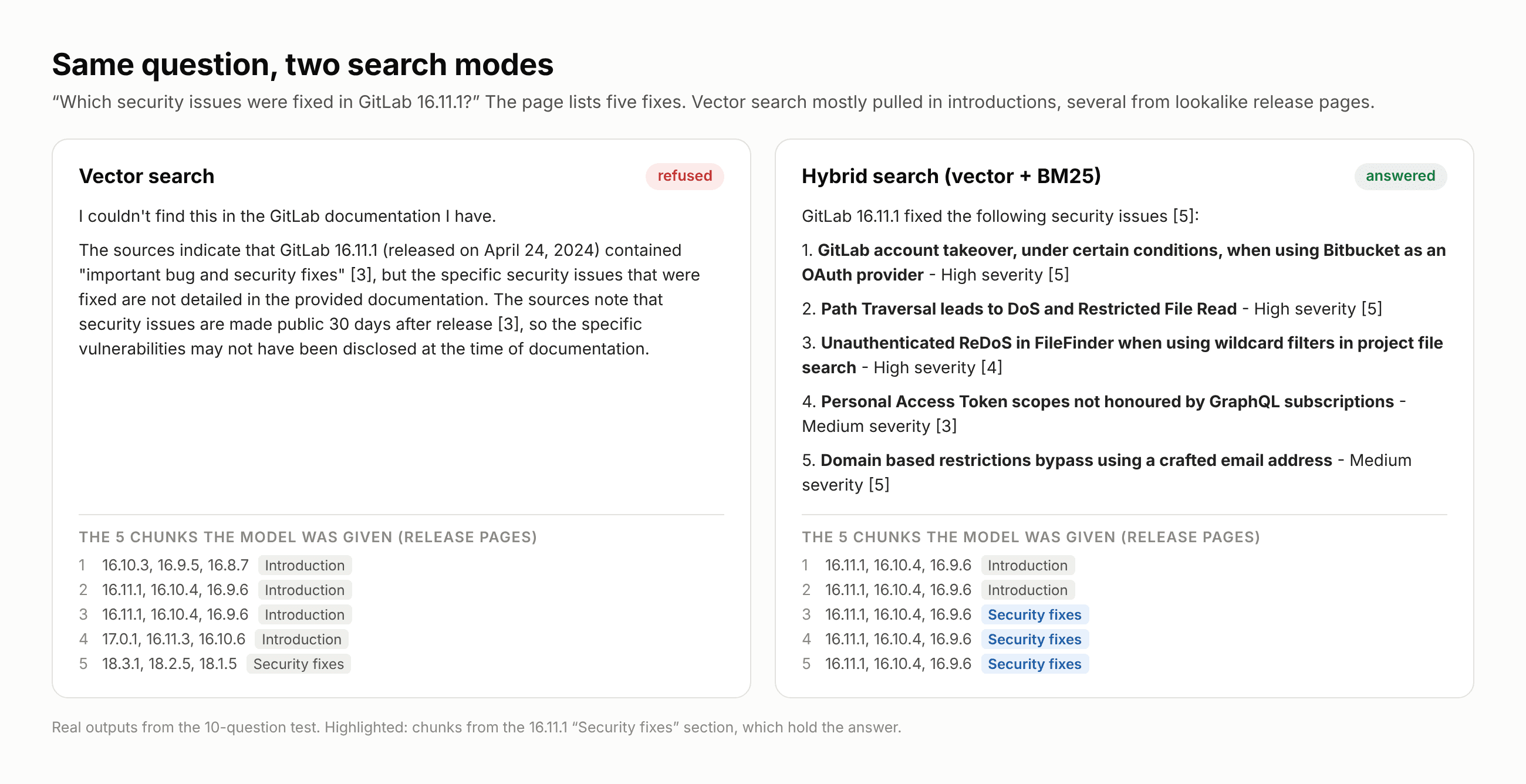
Same question, two search modes. Vector search never retrieved the "Security fixes" section.
Goals and constraints
What the assistant had to do
- Answer questions about GitLab's documentation with numbered citations that link back to the exact page.
- Say "I couldn't find this" when the docs don't cover the question, instead of guessing.
- Ask a clarifying question when a request is too vague to answer.
- Expose everything it retrieved, with scores, so any bad answer can be traced to its cause.
What the evaluation had to do
- Score search and answers separately, so a fix could be aimed at the right stage.
- Compare four search strategies on the same questions before trusting any of them.
- Check whether every claim in an answer is actually supported by its sources.
Constraints
- Cost. Embeddings run locally for free. Answers use Claude Haiku 4.5, one of the cheaper models, and the public demo asks visitors to bring their own API key so it costs me nothing to keep online.
- Hosting. The live app runs on Streamlit Community Cloud's free tier, which puts a hard ceiling on memory.
- Data. Only public documentation, collected politely (a 1.5 second delay between requests) and used under its CC BY-SA 4.0 licence, with attribution.
The approach: measure after every stage
I built the pipeline in stages, and measured after each one before moving on.
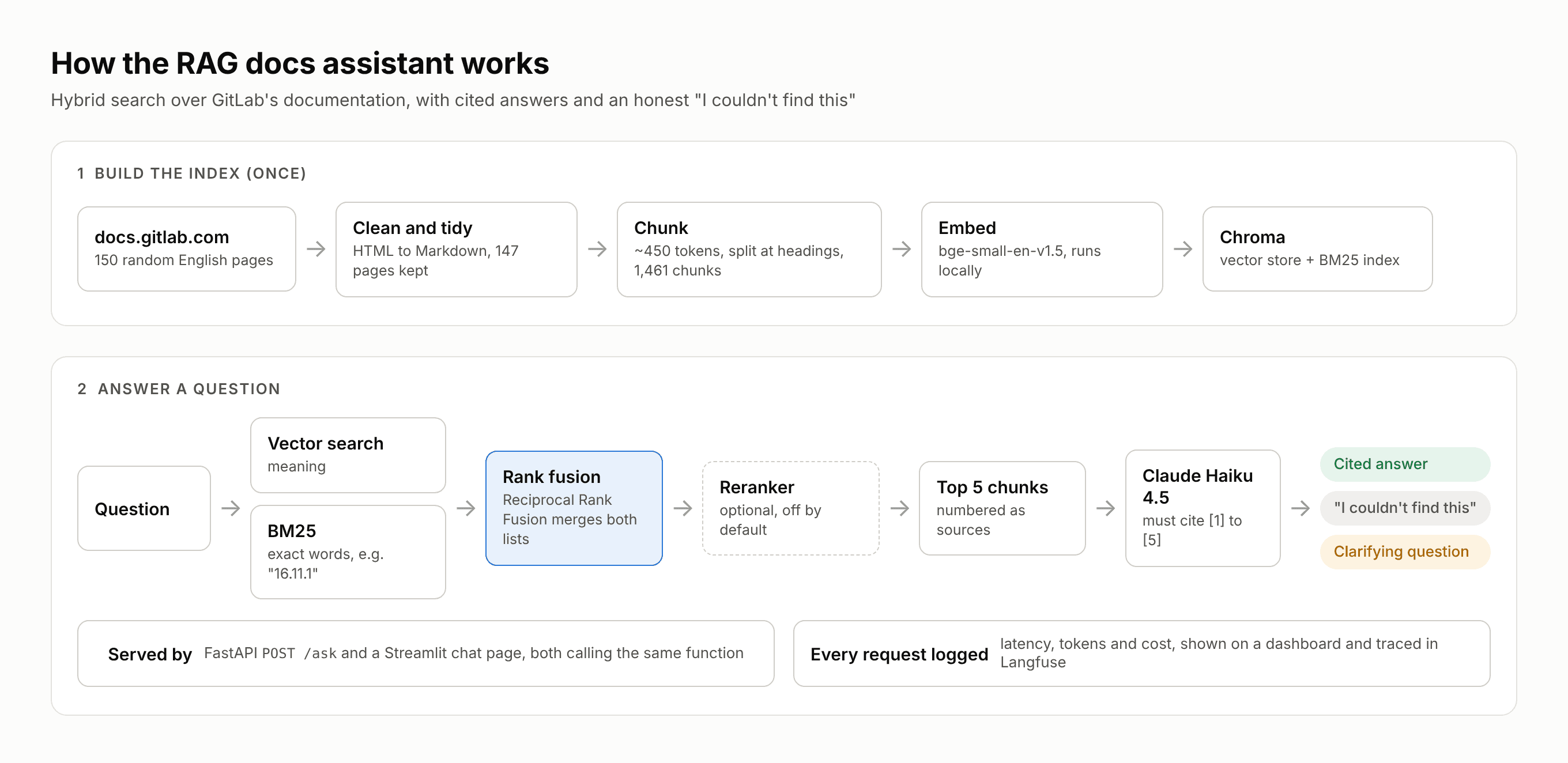
Architecture: build the index once, then two searches, rank fusion, an optional reranker and Claude for every question.
- Collecting and cleaning the data. I downloaded 150 random English pages from docs.gitlab.com (after Shopify's Help Center blocked about 70% of requests) and converted the HTML to Markdown. The first extraction was a mess: about 9,300 punctuation-only lines, flattened tables and a feedback widget on every page. A tidy step fixed most of it. One page was excluded because it held instructions for AI tools rather than product docs, leaving 147.
- Chunking with structure in mind. Pages are split at their headings into chunks of about 450 tokens (hard limit 500, 50 token overlap), measured with the embedding model's own tokenizer. Tables repeat their header row when split, and long code blocks are split by line with every piece keeping its fences. A check script confirms that no text was lost and no chunk goes over the model's limit.
- Four ways to search. Vector search with bge-small-en-v1.5 captures meaning. BM25, written from scratch, keeps version numbers and config names intact. Hybrid mode merges both with Reciprocal Rank Fusion. An optional cross-encoder reranks the top 30.
- Answers that show their work. Claude Haiku receives the top 5 chunks as numbered sources and must cite them. The code flags any citation number that doesn't exist and any answer with no citations. Every API response includes a status, the citations, every retrieved chunk with its scores, token counts and timings.
- Observability. Every request is logged with its latency, tokens and cost. A small dashboard shows mean, median and 95th percentile latency by search mode, and optional Langfuse tracing records the exact prompt and chunks behind each answer.
- A public demo that's safe to leave online. The Streamlit chat page calls the same function as the API. Visitors bring their own Anthropic key, which stays in memory for that visit only and is never written to a file, log or trace. Tests check each of those places.
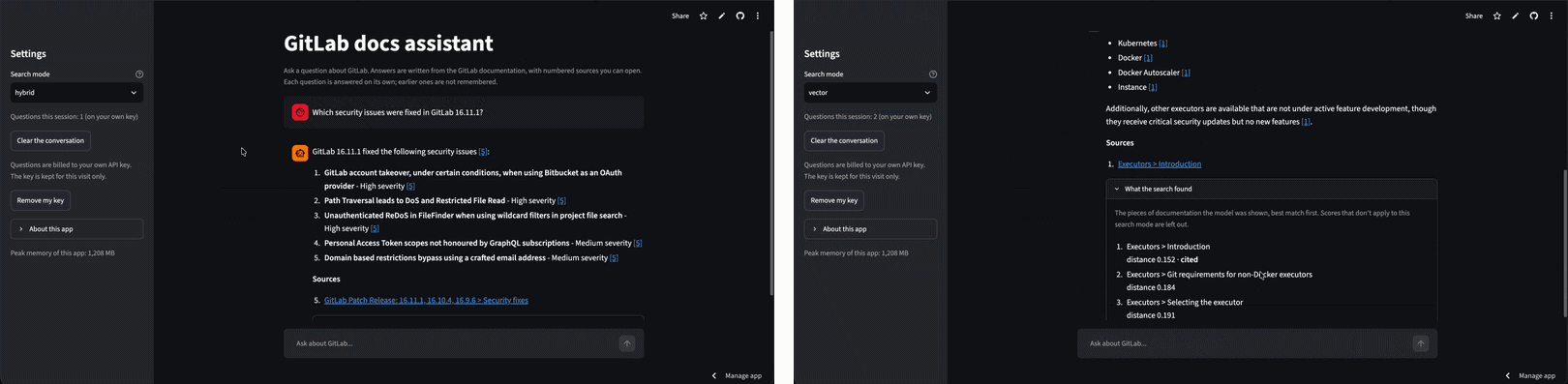
The chat page: a cited answer, and "What the search found" with each chunk's score.
Key decisions
| Decision | What I chose | Why |
|---|---|---|
| Embedding model | bge-small-en-v1.5 | Reads 512 tokens. Chroma's default stops at 256 and would cut chunks in half |
| Keyword search | Custom BM25 | Keeps strings like "16.11.1" and "memory_bytes" whole |
| Default search mode | Hybrid, reranker off | Best evidence recall at top 5 and top 10. The reranker sometimes pushed the right page out |
| "I don't know" logic | Prompt rule, not a score cut-off | Good and bad matches had overlapping similarity scores (0.13 to 0.29 vs 0.28 to 0.43) |
| Judge model | Claude Sonnet 5.5 | A different model from the one writing answers, to avoid self-grading |
| Demo billing | Visitor's own API key | No ongoing cost, and no shared key for strangers to drain |
How I measured quality: search and answers, scored separately
The evaluation ran in two rounds, and the core idea behind both was the same: give every answerable question an evidence string, a piece of text that must be in the retrieved chunks for any model to answer correctly. That turns "did search work?" into a yes or no check that costs nothing to run.
Round 1: 10 targeted questions. Each question was designed to probe a specific weakness: a single fact, a paraphrase, a list, a comparison, near-duplicate pages, a false premise, a gap in the corpus, an off-topic request and a vague question. Hybrid search found the evidence for 5 of 7 answerable questions in the top 5, against 4 for vector search and 3 for BM25 alone. Hybrid also fixed the 16.11.1 security question that vector search had refused, listing all five fixes correctly.
Round 2: 51 questions. 43 questions have a known right page and evidence string. The other 8 should be refused or answered with a clarifying question. Search was scored on its own, with no language model involved. Then the full pipeline ran on all 51, and a judge graded every answer.
The judge. Claude Sonnet 5.5 splits each answer into claims and must quote the exact source text that supports each one. The code verifies those quotes exist. As a control, five answers per mode were judged against the wrong question's chunks, and all five came out unfaithful in both modes. Across roughly 300 claims, the judge invented zero quotes.
Results
Search (43 questions, no language model involved):
| Search mode | Evidence at rank 1 | Evidence in top 5 | Evidence in top 10 |
|---|---|---|---|
| Vector | 30/43 | 41/43 | 42/43 |
| BM25 | 31/43 | 39/43 | 42/43 |
| Hybrid | 34/43 | 42/43 | 43/43 |
| Hybrid + reranker | 35/43 | 41/43 | 41/43 |
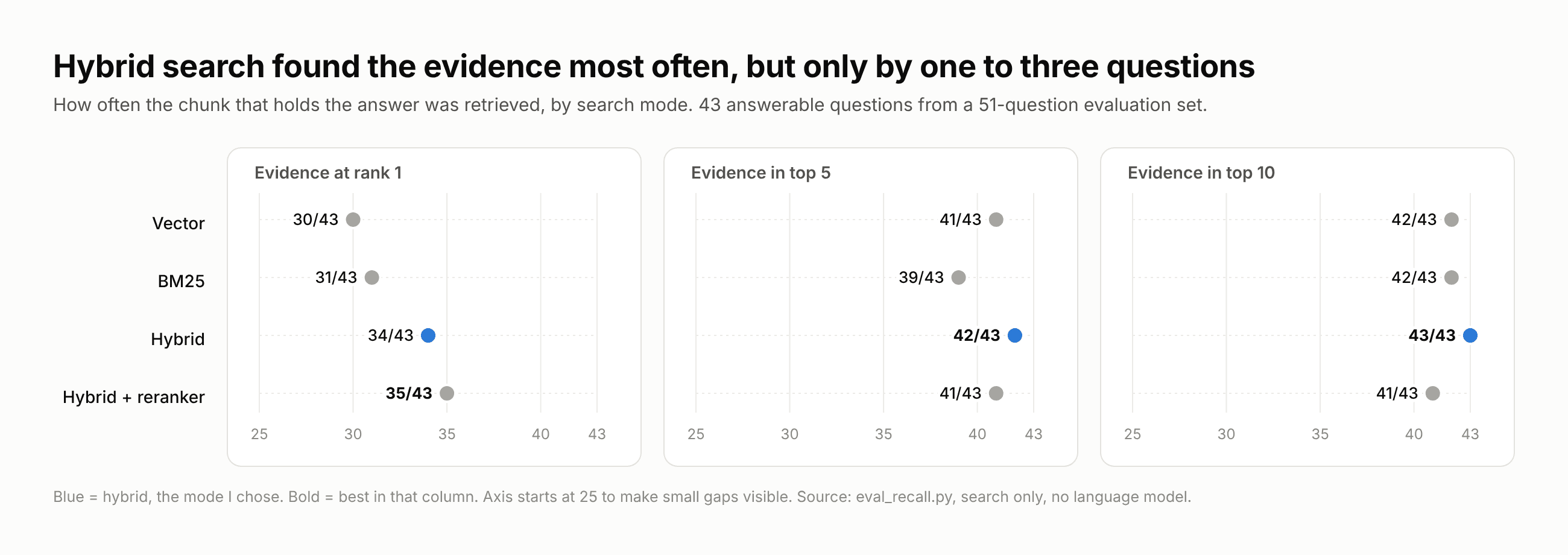
Evidence recall by search mode on 43 answerable questions.
Answers (all 51 questions, full pipeline, graded by the LLM judge):
| Measure | Vector | Hybrid + reranker |
|---|---|---|
| Right kind of reply | 46/51 (90%) | 47/51 (92%) |
| Answered, of the 43 the docs can answer | 40/43 | 41/43 |
| Faithful answers | 37/40 (92%) | 39/41 (95%) |
| Claims backed by the sources | 149/152 | 146/148 |
Performance and cost
- From 30 logged requests across three search modes, median response time was 1.67 to 1.92 seconds, and almost all of it was the model call.
- Search itself took about 60 ms for vector, 80 ms for hybrid and 360 ms with the reranker.
- Average cost was $0.0027 per request, or about $2.74 per 1,000 questions.
- The full 51 question evaluation with the judge cost about $1.20.
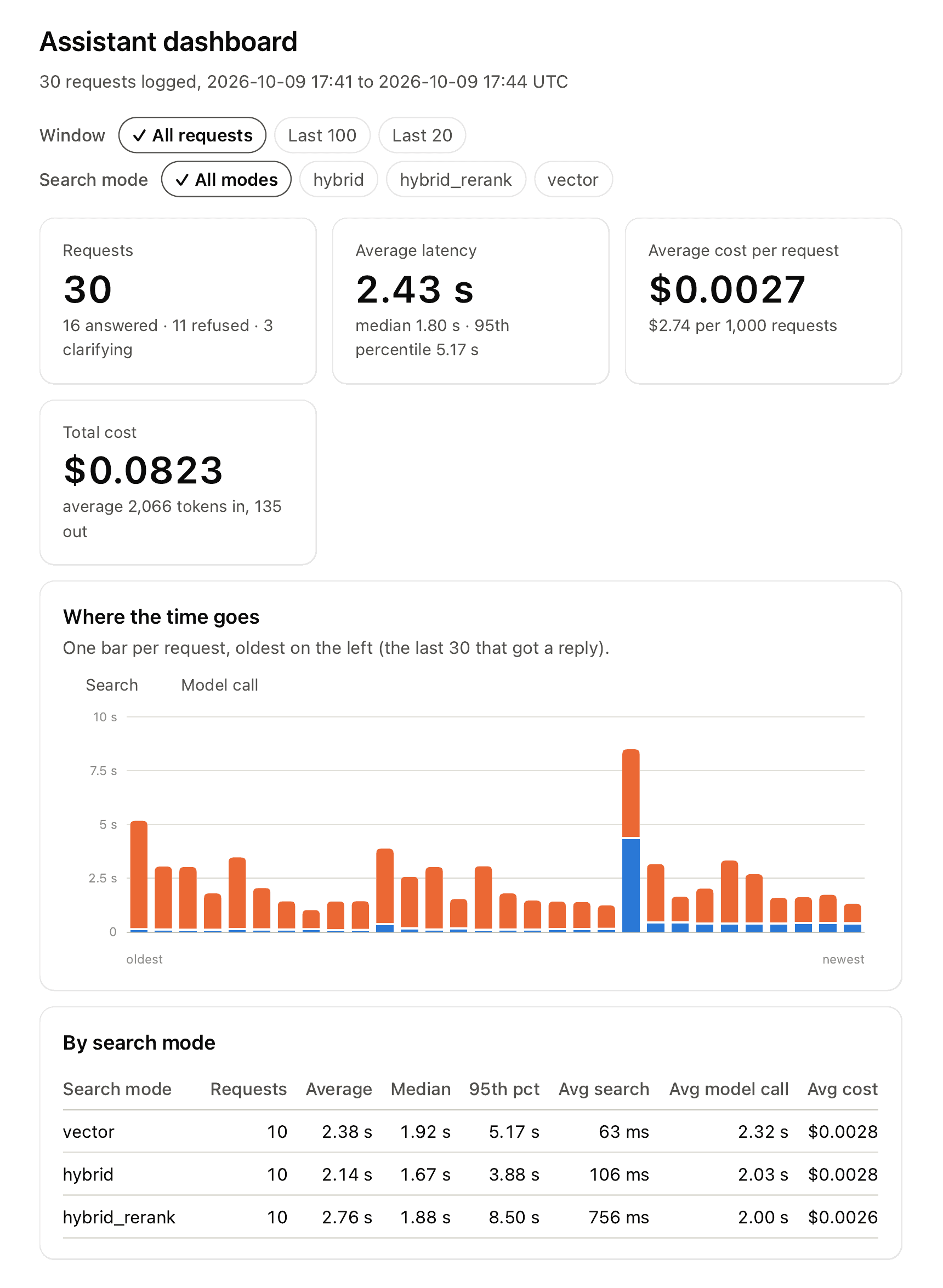
The dashboard: latency percentiles, cost per request, and where the time goes for each request.
What the numbers actually say. I want to be straight about this. The differences between search modes are one to three questions, and the 95% confidence intervals on the answer results overlap almost entirely. On this test set, the modes can't be cleanly separated. What the evaluation did deliver was more practical: a clear map of where answers break. Of five wrong answers I traced in detail, two came from search (one of them the reranker), one from the prompt and two from the model itself.
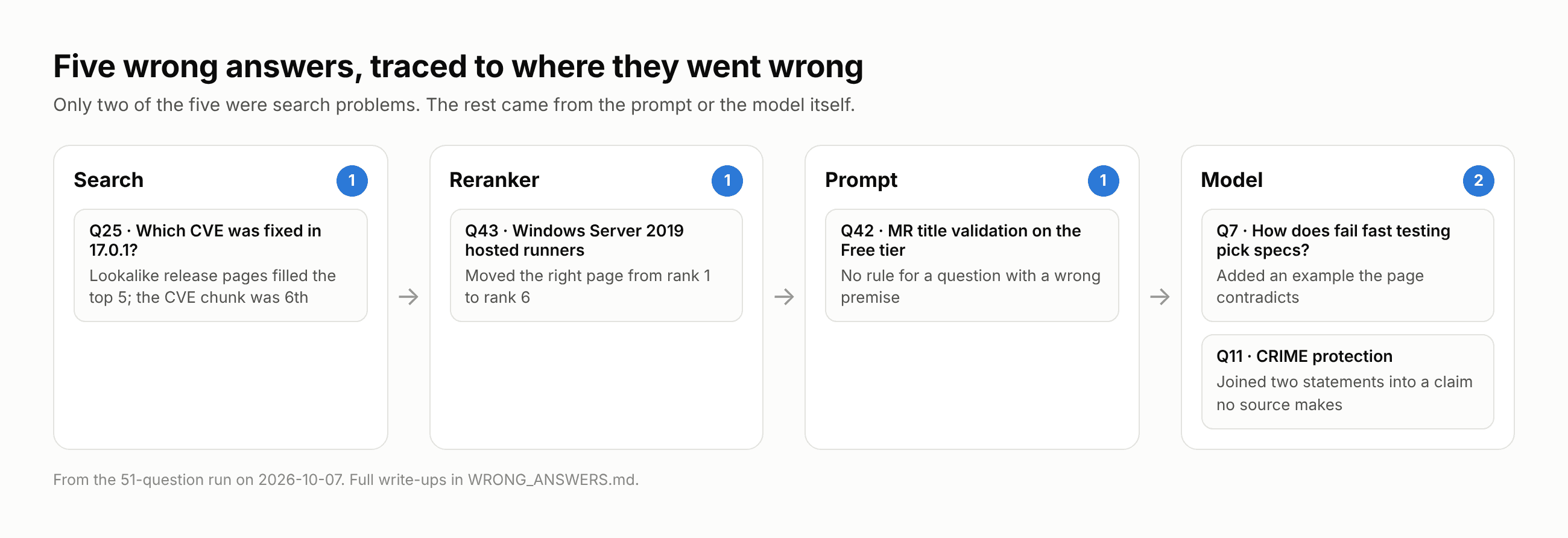
Five wrong answers, each traced to the stage where it went wrong.
Problems I hit and how each was fixed
| Problem | Root cause | Fix |
|---|---|---|
| Near-identical release notes drowned out the answer | Six pairs of chunks from different patch release pages were almost identical as vectors (cosine similarity above 0.98). The chunk with the CVE number sat at rank 6, just outside the 5 the model saw | Hybrid search. A version number or CVE ID is an exact string, which is what BM25 is good at. Hybrid ranked that chunk at number 2 |
| The reranker hurt more than it helped | On a Windows hosted runners question it moved the right page from rank 1 to rank 6, favouring chunks that repeated more of the question's words. It also added roughly a quarter of a second per search | Reranker off by default, kept as a mode for testing other reranker models later |
| Wrong answers that weren't search problems | A false-premise question got "I couldn't find this" followed by the correct explanation, because the prompt had no rule for it. Another answer fused two statements into a claim no source made | Each case written up with its exact cause and a specific prompt change to test next, one rule at a time, re-running all 51 questions after each |
| Tracing failed silently | Langfuse checked the keys with one list of trusted certificates and sent traces with another, which my Python install couldn't verify against | Pointed the trace exporter at the right certificate list, and changed the start-up check to test the same path it was checking |
| A public demo could run up a bill | A public LLM app with the owner's API key is an invitation to drain it. An independent AI review also found that usage limits stored in Streamlit's cache could be reset from any visitor's browser | Visitors bring their own key, held only in memory for their visit. All seven review findings fixed. The code was then broken on purpose 50 times, and tests added until every break was caught |
| Fitting into free hosting | 714 MB peak on my Mac, but 1,208 MB to 1,483 MB on Streamlit Cloud once the reranker was loaded | The embedding model loads only after a visitor enters a key, and the reranker only when that mode is chosen. The sidebar shows peak memory. Several visitors at once is still untested |
Outcome
The project shipped as a working, public RAG assistant with a test harness that makes its behaviour measurable rather than anecdotal.
- A live product. The chat page is online, works on mobile, and costs nothing to keep running.
- A reusable evaluation setup. 51 questions, a free search-only test, a full answer test with an LLM judge, and a control check on the judge itself.
- A clear decision, backed by data. Hybrid search became the default and the reranker was switched off, based on two rounds of testing rather than assumptions.
- Every failure explained. Five wrong answers are documented with the exact stage that caused each one, plus a four-step method for diagnosing new ones from a trace.
- Tested and automated. Eight offline test scripts run on GitHub Actions on every push, with no API key needed.
Lessons learned
- Test search and answers separately. A wrong answer can come from search, the prompt or the model. Without separate scores you end up fixing the wrong stage.
- The quiet failures are the dangerous ones. A refusal is honest. A partial list presented as complete looks fine and is wrong.
- Match the search method to the question. Embeddings handle meaning. Exact strings like version numbers need keyword search.
- Don't assume a reranker helps. Measure it on your own data, especially if your content is tables, JSON or release notes.
- Faithful isn't the same as true. A judge can tell you whether the sources say something, not whether it's correct.
- A passing test only means something if it can fail. Breaking the code on purpose found gaps that a green test run never would.
Limitations and what comes next
Limitations
- A small, easy test set. 51 questions, one run each, written by me with the pages open. Differences of one to three questions are within noise.
- The answer test skipped plain hybrid. It compared vector with hybrid plus reranker, so the mode actually in use has no answer results yet.
- The judge is a language model. It ran once per answer, so a borderline answer can flip between runs, and I only checked the five answers it flagged by hand.
- Free hosting. Memory under several visitors at once is untested, and the free tier can sleep when nobody uses it.
Next steps
- Run the answer evaluation on plain hybrid search, the mode actually in use (about $0.60).
- Test three prompt changes, one at a time: correct a false premise instead of refusing, don't add unrequested examples, and don't merge statements from different sources into a new claim.
- Write harder evaluation questions, without the source page open, or collect them from real users.
- Try a different reranker (bge-reranker-base) and adding each hit's neighbouring chunks, to catch partial lists.
See it in action
A RAG assistant is only as trustworthy as your ability to explain its wrong answers. Separating search quality from answer quality, and checking every claim against its source, turned a vague "it seems to work" into a specific list of what to fix next.
- Try the live demo (you will need your own Anthropic API key)
- Read the code on GitHub
- Read the story behind the build in the blog post
Building something with LLMs and want it to hold up outside a demo? I would be glad to talk. Get in touch.