How I Evaluated My RAG Assistant (and What the Numbers Actually Said)
October 11, 2026
The first version of my RAG assistant looked great. I asked it how to limit memory for Gitaly, it came back with five citations, and every single one checked out against the source page. I was pretty pleased with myself. Then I asked which security issues were fixed in GitLab 16.11.1, and it told me it couldn't find that. The page was sitting right there in the database, listing five fixes.
That gap between "looks great" and "actually works" is what this post is about. I used to think of RAG evaluation as the thing you do at the end, once the build is done. On this project it ended up being most of the work. Over six days I built a retrieval augmented generation assistant on top of GitLab's public documentation, and then spent more time testing it than building it: 10 questions first, then 51, with search and answers scored separately and a second model checking whether every claim was backed by the sources.
Below is what I built, how I measured it, and the few things that genuinely surprised me. If you're building a RAG chatbot and wondering whether hybrid search or a reranker is worth adding, my honest answer is "less than you'd expect, and it depends on your questions." Here's why.
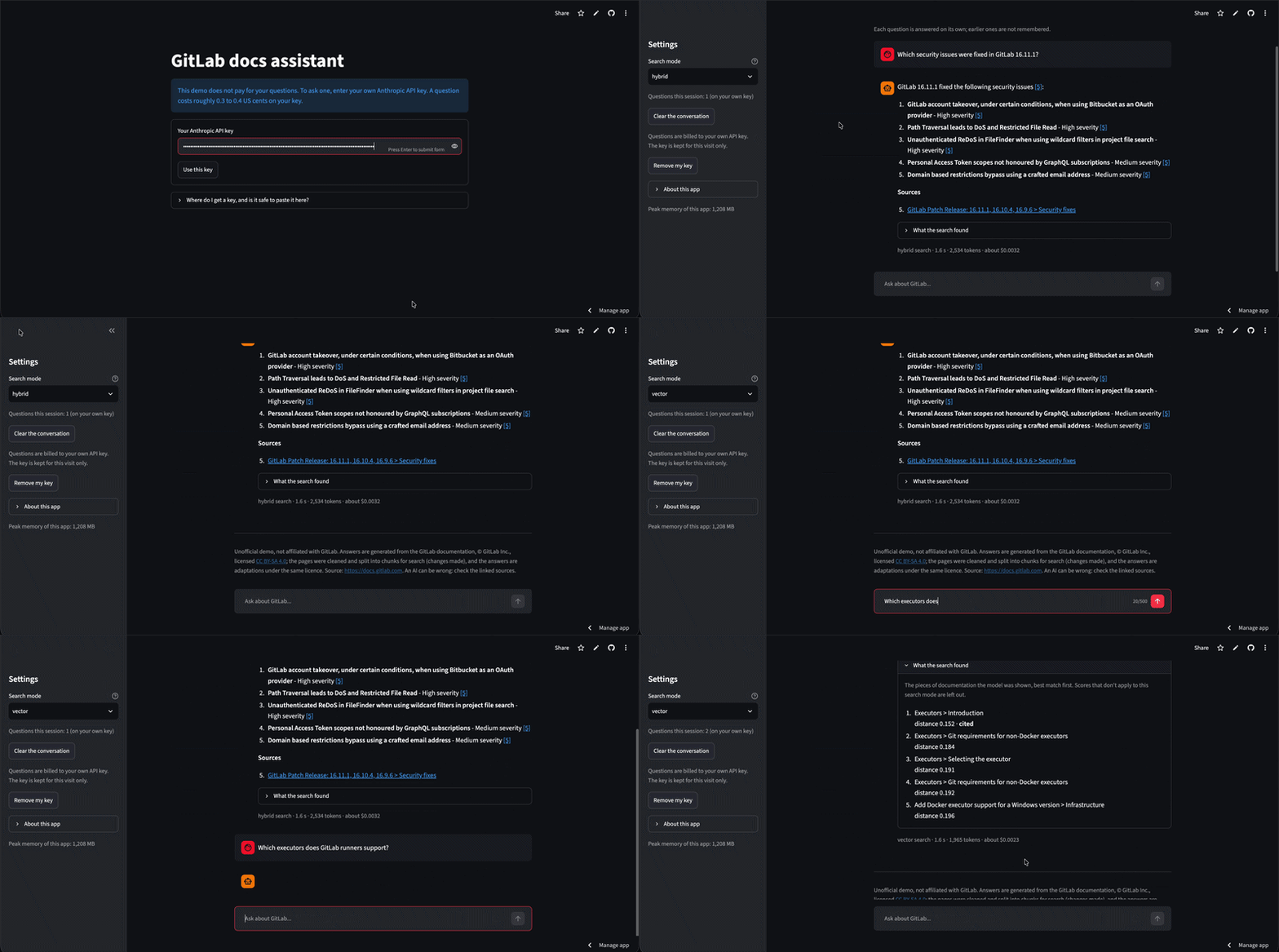
The live app: ask a question about GitLab, get a cited answer back.
What I built: a RAG chatbot for GitLab's docs
The idea is simple. You ask a question about GitLab, and you get one of three things back: an answer with numbered citations you can click, an honest "I couldn't find this in the documentation", or a clarifying question if what you asked was too vague to answer. Those last two matter more than people think. A RAG assistant that confidently answers everything is a liability.
GitLab wasn't my first choice, by the way. I started with Shopify's Help Center, but only 45 of my first 150 requests got through. The rest came back as 403 errors from their bot protection, even though robots.txt allowed the pages. I didn't try to get around it. I switched to GitLab Docs, which served every page without complaint and is published under a CC BY-SA licence. Lesson one, before writing a single line of pipeline code: check that the site will actually give you its pages.
The stack, for anyone curious:
- Data: 150 random English pages from docs.gitlab.com, cleaned down to 147
- Embeddings: BAAI/bge-small-en-v1.5, running locally, stored in Chroma
- Keyword search: a BM25 implementation I wrote from scratch
- Reranker (optional): cross-encoder/ms-marco-MiniLM-L6-v2
- Answers: Claude Haiku 4.5
- Faithfulness judge: Claude Sonnet 5.5
- Serving: FastAPI for the API, Streamlit for the chat page
- Monitoring: a local request log, a small dashboard and optional Langfuse tracing
- Tests: GitHub Actions on every push
You can try the live demo with your own Anthropic API key (a question costs roughly 0.3 to 0.4 US cents), or read the code on GitHub.
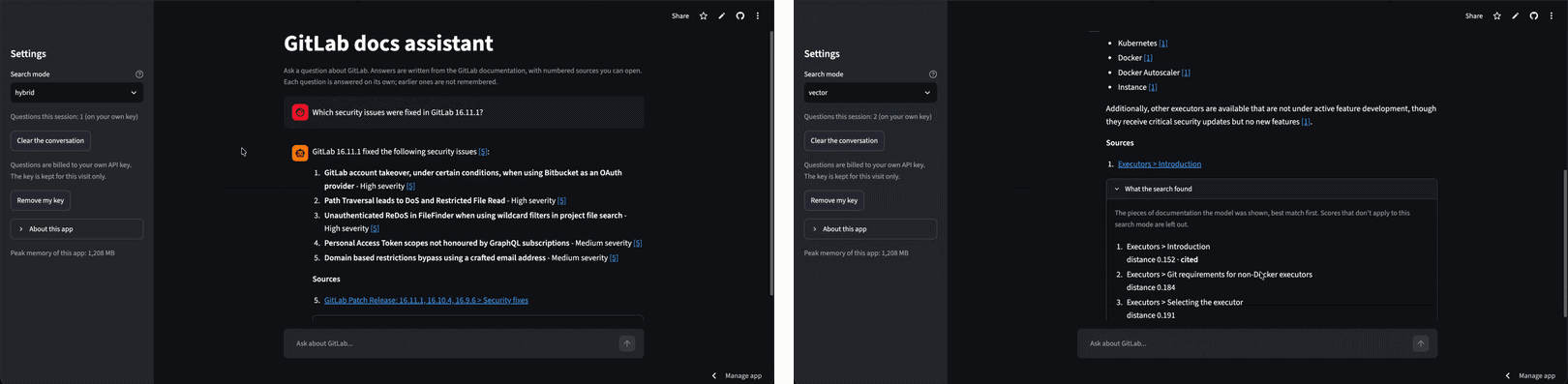
Left: a cited answer with its Sources list. Right: "What the search found", the chunks the model saw and their scores.
How the pipeline works
If you've built a RAG system before, most of this will look familiar. The interesting bits are in the details, so I'll focus on those.
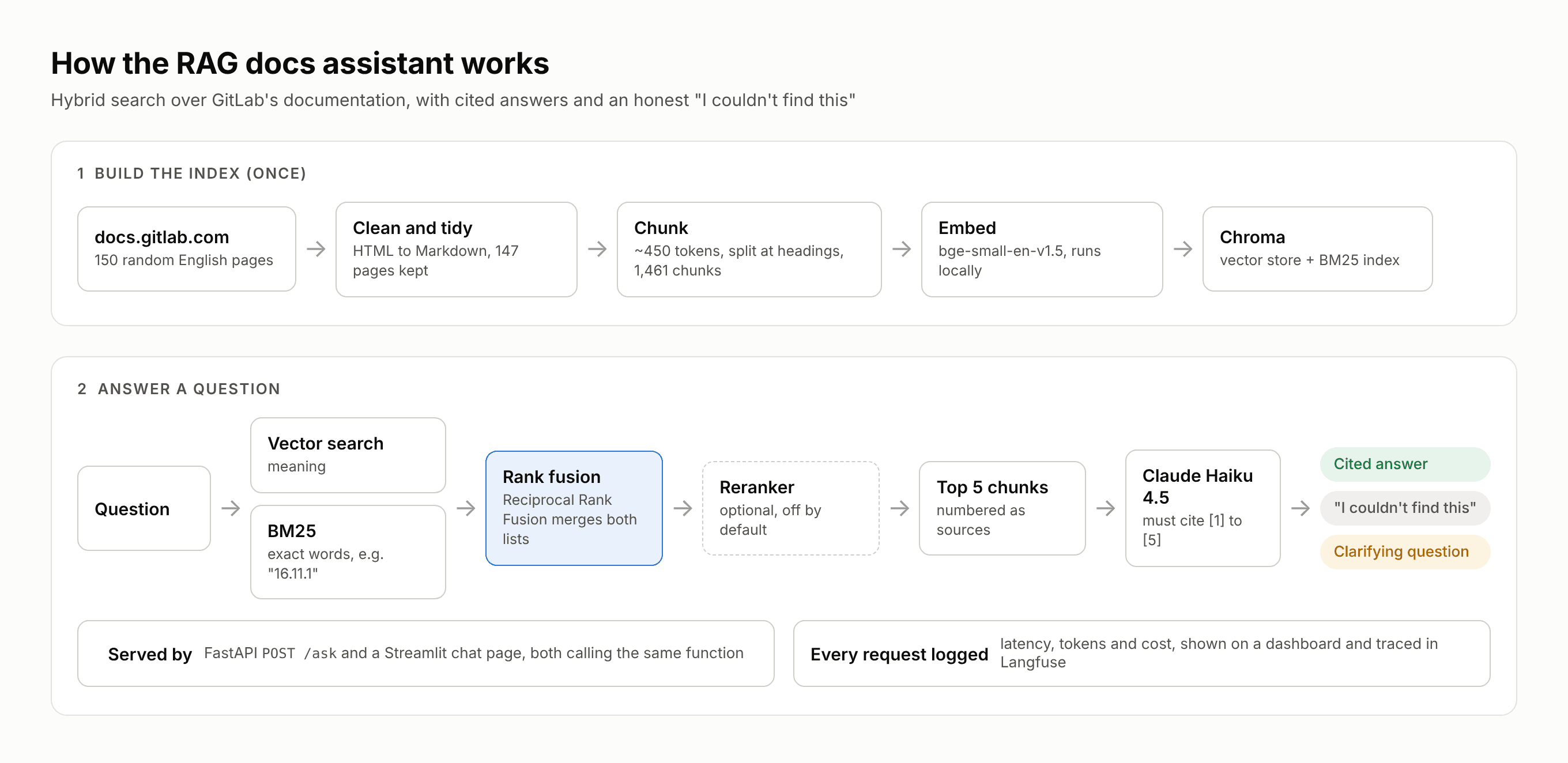
Build the index once, then every question goes through two searches, rank fusion and Claude.
- Cleaning. My first attempt at pulling text out of the HTML left about 9,300 lines that were nothing but punctuation, flattened every table, and kept a "Was this page helpful? Yes No" widget on all 150 pages. Switching to an HTML to Markdown conversion plus a small tidy step fixed most of it. Real documentation is messier than tutorials make it look.
- Chunking. Pages are split at their "##" headings and packed into chunks of about 450 tokens, with a hard limit of 500 and a 50 token overlap. I counted tokens with the embedding model's own tokenizer, because that's the limit that actually matters. I also had to restore the language labels on roughly 480 code blocks, many of them nested inside lists. The result: 1,461 chunks, median size 333 tokens.
- Embedding. I used bge-small-en-v1.5 because it reads up to 512 tokens. Chroma's default model stops at 256, which would have quietly cut my chunks in half.
- Search. There are four modes: vector only, BM25 only, hybrid (both lists merged with Reciprocal Rank Fusion), and hybrid plus a cross-encoder reranker that reorders the best 30 candidates. I wrote BM25 myself so it would keep things like "16.11.1" and "memory_bytes" whole instead of chopping them up.
- Answering. The top 5 chunks go to Claude Haiku as numbered sources, and the model has to cite them as [1], [2] and so on. The code then checks those citations: a number that doesn't exist gets flagged, and so does an answer with no citations at all.
Every reply from the API carries a label (answered, refused, clarifying or uncited) and the full list of retrieved chunks with their scores. That second part turned out to be the most useful design choice in the whole project. When an answer is wrong, you can see straight away whether the right text ever reached the model.
One early finding worth sharing: I'd planned to use the similarity score as a cut-off for "I don't know." It doesn't work. Good matches scored between 0.13 and 0.29, while off-topic and vague questions scored between 0.28 and 0.43. The ranges overlap, so a fixed threshold would either reject good questions or let bad ones through.
How I set up the RAG evaluation
The single most useful idea I took from this project: test search and answers separately. A wrong answer can come from two very different places. Either the right text never reached the model (a search problem), or it did and the model got it wrong anyway (a prompt or model problem). If you only grade the final answer, you can't tell which one you're looking at, and you'll end up fixing the wrong thing.
So every test question that has an answer also has an "evidence" string: a piece of text that must appear in the retrieved chunks for any model to answer correctly. If the evidence isn't there, it's a search failure, full stop. That check costs nothing to run, because it never calls a language model.
Round 1: ten questions, read by hand
I started small on purpose. Ten questions, each picked to poke at a different weakness: a single fact, a paraphrase, a list, a comparison, near-duplicate pages, a false premise, a topic the docs don't cover, an off-topic request and a vague one.
Hybrid search came out on top, finding the evidence for 5 of 7 questions in the top 5 results, against 4 for vector search. But honestly, the scores told me less than reading the answers did. On the 16.11.1 security question, vector search refused, hybrid listed all five fixes correctly, BM25 alone listed four and left out the most severe one, and the reranker listed only two. Both partial answers were worded as if they were complete. No automatic check caught that.
Round 2: 51 questions, scored properly
Ten questions can show you a direction, not prove anything, so I wrote 51. Forty-three have a known right page and an evidence string. The other eight shouldn't be answered at all: three are about topics missing from my sample, two are off-topic and three are too vague.
Search results (43 scored questions):
| Search mode | Evidence at rank 1 | Evidence in top 5 | Evidence in top 10 |
|---|---|---|---|
| Vector | 30/43 | 41/43 | 42/43 |
| BM25 | 31/43 | 39/43 | 42/43 |
| Hybrid | 34/43 | 42/43 | 43/43 |
| Hybrid + reranker | 35/43 | 41/43 | 41/43 |
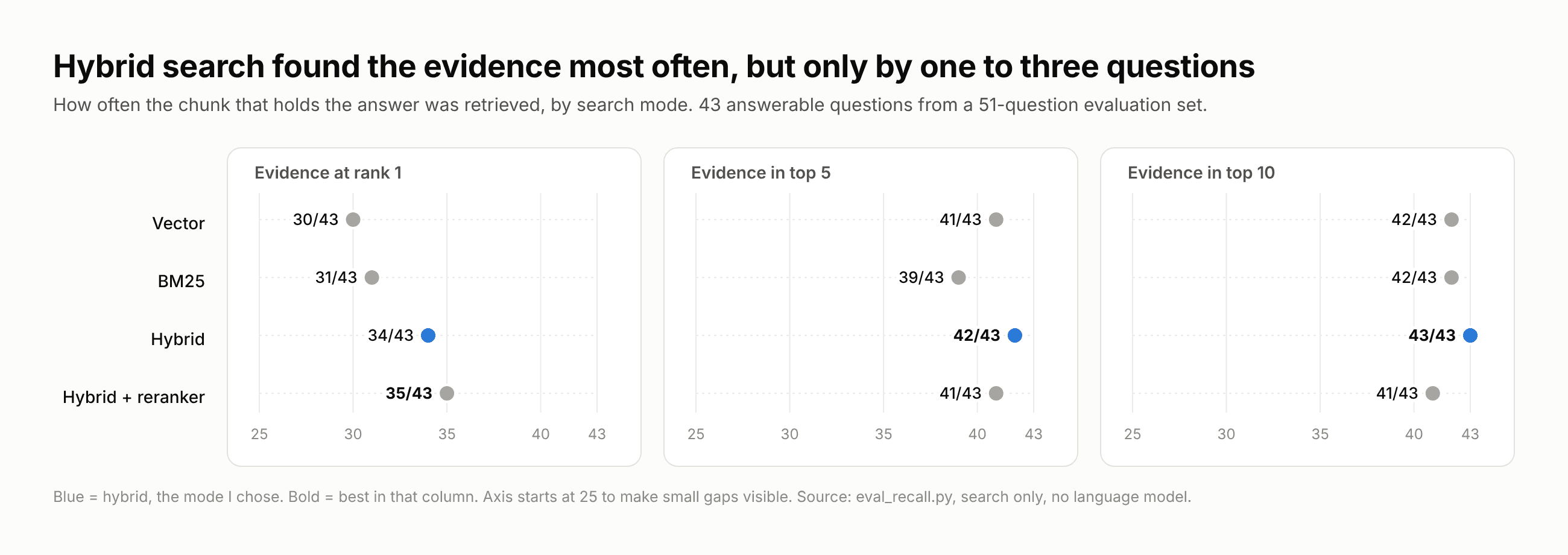
Hybrid wins at top 5 and top 10, the reranker at rank 1. The gaps are one to three questions.
Hybrid wins at top 5 and top 10, and the reranker wins at rank 1. But look at the size of the gaps: one to three questions. On a set this size, that's a lean, not a result.
Checking faithfulness with an LLM judge
Next I ran the whole pipeline on all 51 questions and asked a second model to grade every answer. The question it answers is faithfulness: is every claim in the answer backed by the five chunks the model was given?
A few things I did to keep the judge honest:
- The judge is Claude Sonnet 5.5, not the Haiku model that wrote the answers. Models tend to go easy on their own writing.
- It has to split each answer into claims and copy the exact words that support each one. The code then checks those words really exist in the source. An invented quote counts as unsupported.
- As a control, I fed it five answers paired with chunks from a different question. All five should fail. They did, in both modes.
| Measure | Vector | Hybrid + reranker |
|---|---|---|
| Right kind of reply (all 51) | 46/51 (90%) | 47/51 (92%) |
| Faithful answers | 37/40 (92%) | 39/41 (95%) |
| Claims backed by the sources | 149/152 | 146/148 |
The whole run cost about $1.20, and 80% of that was the judge.
Then I read the five answers the judge flagged. Two were real errors, two were borderline, and one was the judge being too strict (it wouldn't accept that 0.3 means 30%). The most interesting real error was about CRIME, a TLS vulnerability. One source said a setup might be vulnerable with compression or SPDY. A scanner report in another chunk listed the two as alternatives. The model fused them into "CRIME requires both," which no source says. It sounds like a perfectly reasonable summary, which is exactly why nobody would catch it on a quick read.
That's the line I keep coming back to: faithful isn't the same as true, and unfaithful isn't the same as false. A judge can only tell you whether the sources say it.
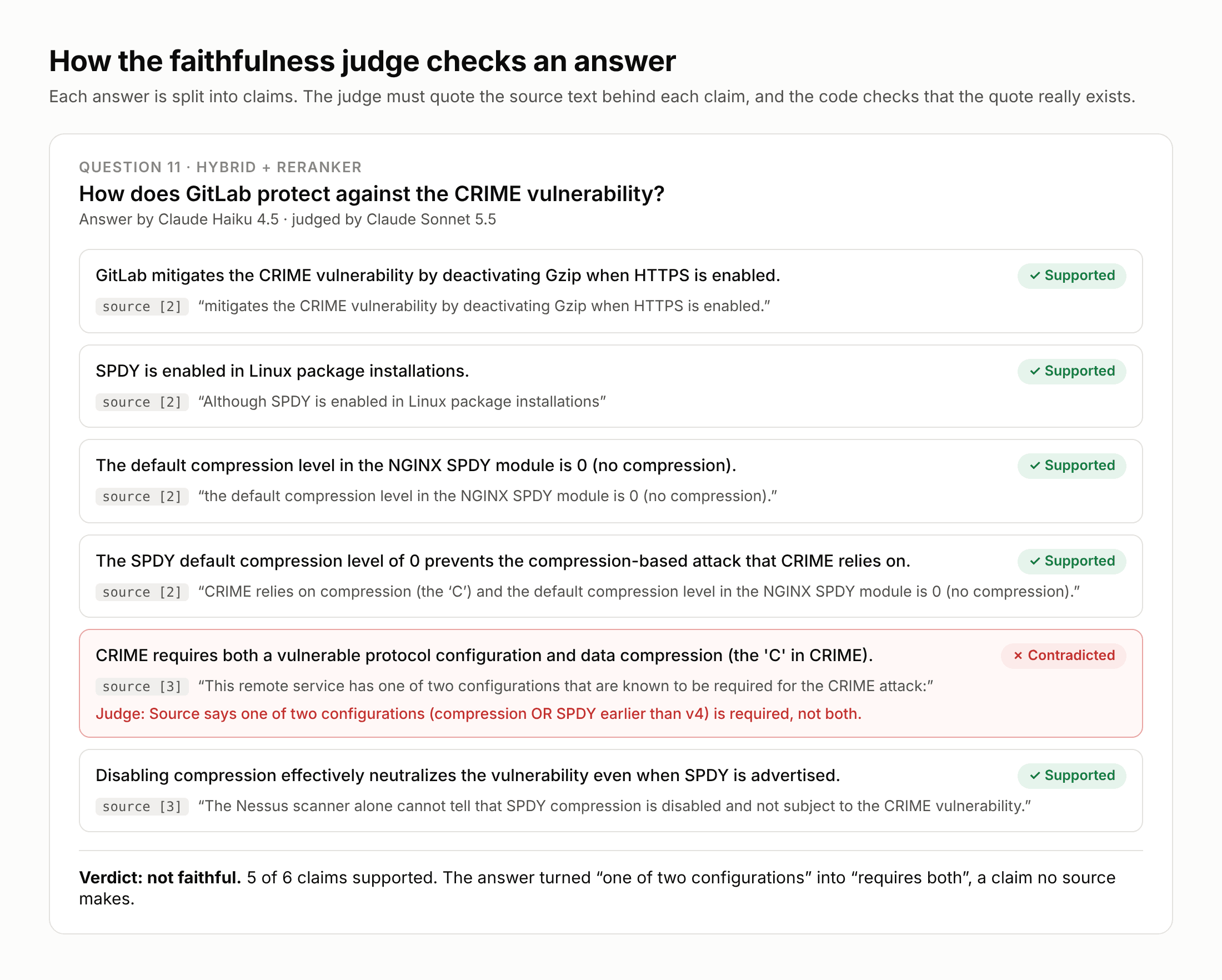
The CRIME answer, claim by claim. Five claims are backed by a quote; one turns "one of two" into "both".
Five things that surprised me
1. The worst failures were the quiet ones
A refusal is annoying, but at least it's honest. The answers that scared me were the ones that looked fine. Ask for the fields in GitLab's push event payload and the assistant listed 15 of the 19, then stopped, with no hint that anything was missing. The JSON example on the page was split across several chunks, and only the first one was retrieved. Nothing in my pipeline catches a partial list presented as a complete one yet, and I'd bet most RAG systems in production have the same blind spot.
2. Hybrid search helped for one specific reason
Vector search is great at meaning and bad at exact strings. Version numbers and CVE IDs are exact strings. GitLab has a lot of near-identical patch release pages, and six pairs of chunks from different releases were almost the same vector. So when I asked about 16.11.1, vector search filled the top 5 with lookalike pages and pushed the actual answer out. Adding BM25 fixed it, because "16.11.1" is just a keyword. I ended up choosing plain hybrid search as the default.
3. The reranker made things worse, sometimes
I expected the cross-encoder reranker to be an easy win. It wasn't. On a question about Windows hosted runners, hybrid search had the right page at rank 1. After reranking, it was at rank 6, out of the top 5, replaced by security scanning chunks that happened to repeat more of the question's words. My untested guess is that a model trained on web passages doesn't score JSON, tables and release notes very well. It also adds roughly a quarter of a second to every search. For now it's off.
4. Most wrong answers weren't search problems
I'd assumed retrieval would be the main source of errors. Out of five wrong answers I wrote up in detail, only two were caused by search. The other three came from the prompt or the model. For example, if you ask how to turn on a feature on the Free tier and that feature is Premium only, the model would say "I couldn't find this," and then explain the correct answer right after. The facts were right. The prompt just had no rule for a question with a wrong premise. No amount of search tuning would have fixed that.
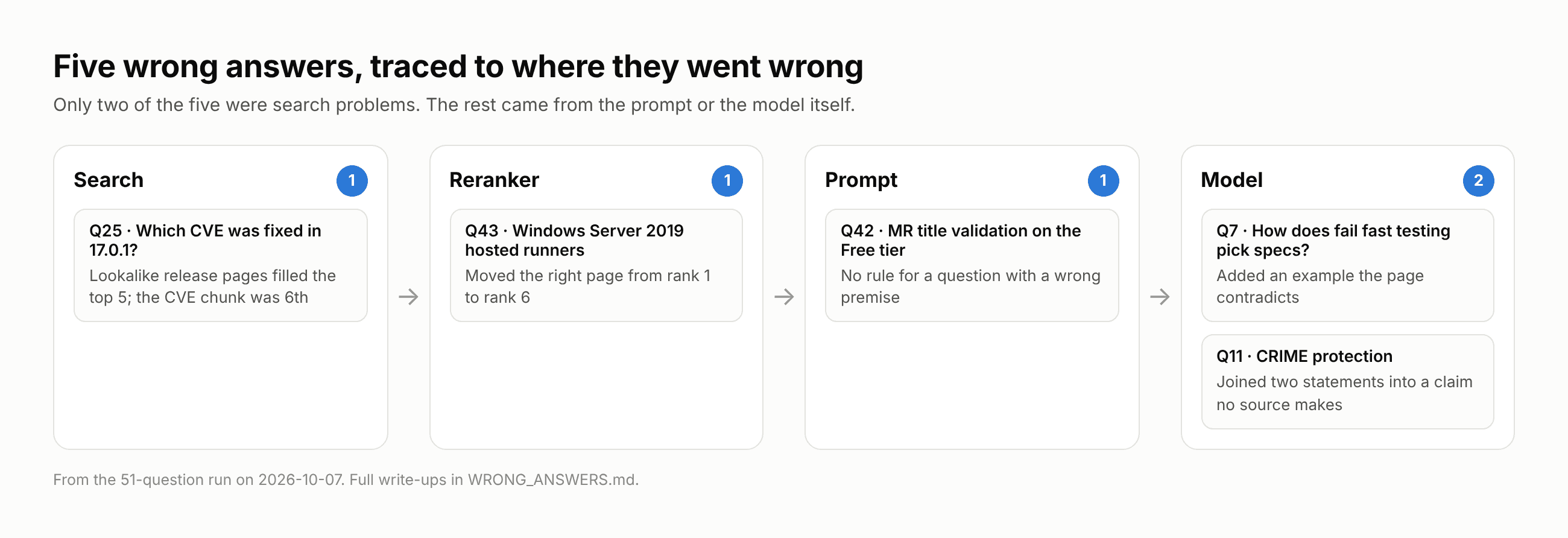
Five wrong answers, each traced to the stage where it went wrong.
5. Small test sets can't settle close calls
This one's a bit uncomfortable. After all that work, I can't honestly say hybrid plus reranker is better than vector search on answers. The difference is one or two questions out of 51, and the 95% confidence intervals overlap almost completely. What the evaluation did give me was something more useful than a winner: a clear list of what breaks, and where.
What I'd do differently next time
- Write harder test questions. I wrote mine with the pages open, so they share a lot of words with the source. Real users don't do that. Questions written blind, or taken from actual users, would be a much tougher test.
- Add tracing from day one. I added Langfuse tracing late. Being able to open a bad answer and see the exact prompt and chunks the model saw is how I diagnosed most of the failures above. I'd build it in from the start.
- Test the tests. Toward the end I broke my own code on purpose 50 times to see if the tests would notice. Four of the 12 breaks I made around API key handling slipped past my first tests, including one where I made the code write the key to a log file and no test complained. A passing test suite only means something if it can fail.
Try it yourself
The live demo runs on Streamlit's free tier. It asks for your own Anthropic API key, keeps it in memory for your visit only, and never writes it anywhere. I'd suggest creating a key just for the demo and deleting it afterwards. The first question takes a moment while the embedding model loads.
If you'd rather run it locally, everything is on GitHub, including the 51 evaluation questions, the judge, and notes on every messy decision along the way. The search-only evaluation is free to run. The full answer evaluation costs about $0.60 per search mode.
Frequently asked questions
What is RAG evaluation?
RAG evaluation is the process of measuring how well a retrieval augmented generation system works. A good setup scores the retrieval step (did the right text come back?) separately from the generation step (did the model use it correctly?), so you know where a failure actually happened.
Is hybrid search better than vector search for RAG?
Often, but not always. In my tests hybrid search found the right evidence slightly more often, mainly on questions with exact strings like version numbers and CVE IDs, where keyword search shines. On a 43 question test set the gap was one question, so test it on your own data before deciding.
Does a reranker always improve RAG results?
No. My cross-encoder reranker improved the top result slightly but pushed the right answer out of the top 5 on some questions and added latency. Rerankers trained on web text can struggle with tables, JSON and release notes.
What does faithfulness mean in RAG?
Faithfulness means every claim in an answer is supported by the source chunks the model was given. It doesn't mean the answer is correct. An answer built from the wrong chunks can be perfectly faithful and still wrong.
How much does it cost to run a RAG assistant like this?
With Claude Haiku 4.5 and about 2,000 input tokens per question, each answer cost roughly $0.003, or about $2.74 per 1,000 questions in my logs. Running the full 51 question evaluation with an LLM judge cost about $1.20.
Wrapping up
If there's one thing I'd want you to take from this, it's that a RAG demo and a RAG system are different things. The demo answers your easy questions well. The system is the one that tells you when it's wrong, why, and at which step. Building the assistant took a couple of days. Building the means to trust it took the rest of the week, and that's the part I'd do again first.
Try it or read more
- Try the live demo (you will need your own Anthropic API key)
- Read the code on GitHub
- Read the full case study
- Working on something similar and want to compare notes? Get in touch